24 July 2008 - 14:43Firefox 3.1 Restricts, Matches, Keywords

In the upcoming Firefox 3.1 Alpha 1, there’s some new ways to change what shows up in the Smart Location Bar such as restricting results to show only your history (and not your unvisited bookmarks) or matching only in the URL instead of also in the title. Additionally, you can see your Smart Keywords queries show up in the drop down.

For Alpha 1, you can restrict the search to your history by typing “^”, or bookmarks with “*”, or tagged pages with “+”. To make what you’ve typed match only in the URL type “@”, and for title/tags only use “#”.

You can first start typing something you want to find like “mozilla”..
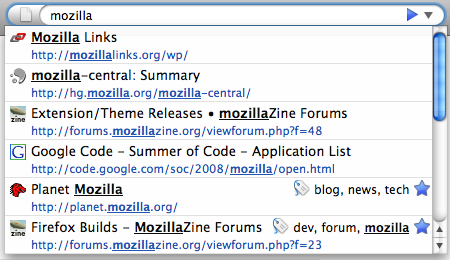
Search \"mozilla\"
All results that match "mozilla"

Then realize that there’s too many results and you know it’s a page that you’ve tagged, so you restrict the results with “+”..
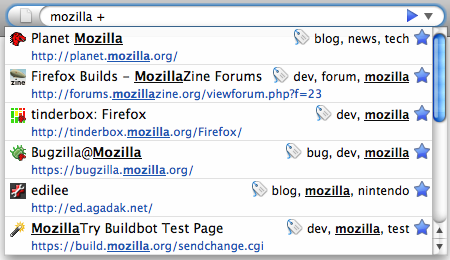
Search \"mozilla +\"
Restricting "mozilla" to tagged pages

Then continue narrowing the results by typing more words..
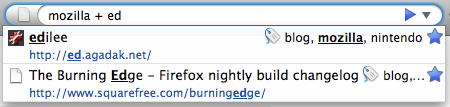
Search \"mozilla + ed\"
Quickly finding pages out of thousands

If you prefer the results to always restrict to history and match only in the URL, you can go to about:config and change the corresponding preferences to nothing (edit the value and delete the special character). This way you can always be only searching your visited history and not worry about matching in the title. If you’ve installed Hide Unvisited [ed.agadak.net], you can uninstall it and just change browser.urlbar.restrict.history to “” (nothing).
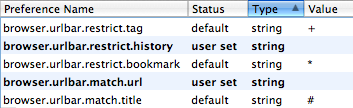
about:config urlbar
Preferences to change default restrict/match behavior

As with the Hide Unvisited add-on, restricting to history will only show pages that you have visited and are stored in your history. This means if you visit a bookmark, it will still show up even when restricting to history. However, you can select the entry from the location bar and hit Delete, or delete pages from the History Panel, or just Clear History to make them disappear.

If you don’t like the standard characters to enable restrict/match, you can modify the values from about:config to be whatever you want. They can be single characters, whole words, even words in other languages.

One last thing about Keywords is that you can now see what you’re going to search with a Smart Keyword Bookmark. You can even assign multiple bookmarks the same keyword so one can be the default Wikipedia search and another can use I’m Feeling Lucky [google.com]. You can uninstall Show Keywords [addons.mozilla.org] if you’re using that for Firefox 3.
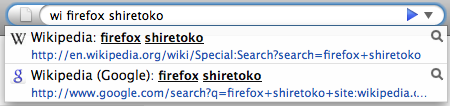
Wikipedia Smart Keyword
Choose from multiple Smart Keyword Searches

103 Comments | Tags: Add-on, Mozilla

Comments:

  1. The awesomebar is great. The only changes I’d make are:
    1) when you click the drop down without having typed anything, show recently (~2 weeks) frequently used pages rather than from the whole history and;
    2) if the letters typed haven’t been typed before, give preference to “shorter” urls. (By shorter, I mean fewer sub-domains/folders in the url, not fewer characters.) For example, when I type “edilee” (which I’ve never done before), it shows http://ed.agadak.net/2008/07/firefox-3-smart-location-bar-saves-you-time#respond first rather than http://ed.agadak.net/, which I think everyone would agree is the wrong way around.

  2. Blair McBride says:
    24 Jul 2008 - 19:36

    I’ve been waiting for this!

  3. About the keywords, it cannot show the search bar’s and some keywords in javascript, but “Show Keywords” can do this

  4. Yay, finally they’re back! :D

  5. J (not Lo) says:
    25 Jul 2008 - 1:04

    Thanks for the detailed description, I start to ‘love’ the awesomebar.

  6. jack: Javascript bookmarks were filtered out for potential security issues, so normally you have to type “javascript:” to get the bookmark (or history page) to show up. But in the context of keywords, that wouldn’t really work without changing the keyword. I’ve filed bug 448033 for that issue.

    About showing search bar keywords, that’s bug 445955.

  7. [...] Fixed: 395161 - Make it possible to restrict the url bar autocomplete results to bookmarks/tagged/history entries and match only url/title. (Mardak’s blog entry) [...]

  8. Wow, that keyword thing is a seriously great idea. I thought the devs had all forgotten about it with all the attention given to the url bar.

  9. [...] Lee: Firefox 3.1 Restricts, Matches, Keywords. There will be new ways to limit what comes up in the Smart Location Bar. (Kudos to Ed for using [...]

  10. Akohler says:
    27 Jul 2008 - 2:58

    I think there really is a strong need to be able to exclude some bookmarkfolders or single bookmarks completely from appearing in the awesomebar.
    For example at work i don’t won’t the newspaperbookmarks to appear, when i am browsing with a costumer or coworker.

    Will this be possible?

  11. [...] more details you can check this Edward Lee’s post on the matter. He is the developer largely responsible for this [...]

  12. [...] more details you can check this Edward Lee’s post on the matter. He is the developer largely responsible for this [...]

  13. hippiejake says:
    28 Jul 2008 - 23:18

    Hmm, I was hoping the tag restrictions would search only the tags themselves, rather than all parts of any tagged page.
    Still very nice, thanks, I’ve been waiting for this one feature since you mentioned it [http://ed.agadak.net/2008/03/beyond-awesome] around v3.0b4.

  14. It was decided that matching only tags wouldn’t be as useful once you find the tag. If you have a lot of pages tagged with “food”, once you type food, you can’t narrow down the list any more without typing in more tags.

    Instead, when you force the title to be matched, it will also match against the tags.

  15. [...] Several improvements to the Smart Location Bar [...]

  16. [...] más detalles puede comprobar el post de Edward Lee’s post (en inglés) sobre el tema. Él es en gran medida el desarrollador responsable de esta [...]

  17. [...] Several improvements to the Smart Location Bar [...]

  18. Egbert says:
    29 Jul 2008 - 4:38

    I probably missed something here, but I cannot see how to implement the following behaviour:
    I would prefer FF to match only tags, bookmarks and URLs that I manually entered (like browser.urlbar.matchOnlyTyped).
    Any plans to implement this?

  19. Reysan says:
    29 Jul 2008 - 5:19

    The systems at work have the “smart bar” completely disabled. Why? Because having two search bars is redundant. If we wanted to look for a dozen things that start with “anan”, we’d use the search bar. When we want to go to http://www.anandtech.com, we just type that in. The best “new feature” for the smart bar would be a one-click complete disable.

  20. [...] Возможность отключения способа формирования списка близких URL при наборе в строке адреса, например, можно выборочно отключить учет истории посещений, тэгов и закладок , и оперировать только поиском в заголовках и URL открытых ранее страниц. Исключение истории определяется через ввод символа "^", тэгов - "*" и закладок - "+", поиск только в заголовках - "#", поиск в ранее открытых URL - "@". Управляющие символы можно переназначить через about:config; [...]

  21. Reysan: The “two” search bars do different functionality. The Smart Location Bar searches your history and is optimized to show things that you’ve used more often. With the Enter Selects add-on, I just type “an” to get to anandtech and “ar” to get to arstechnica. I didn’t have to configure any keywords. Firefox learned my behavior after selecting those sites from the list and this saves me time.

  22. [...] Several improvements to the Smart Location Bar [...]

  23. While I love the awesome bar, one bit of feedback: It is sometimes slow. Not always, but on occasion when I start typing a word in the location bar, the browser seems to hang for a few seconds, and the text I’ve typed stops mid word, and then finishes after the “hang”. I assume this is because the awesome bar is performing a query. I don’t have the world’s fastest computer, by the way:
    AMD Turion 64, 1.1 Ghz
    1 GB of RAM
    WinXP

  24. [...] In short, query selectors allow Javascript to use CSS selectors as an argument in a function to select certain elements. Read the Selectors API (linked above) for more. Several improvements to the Smart Location Bar [...]

  25. [...] of the neat new features that Shiretoko boasts are page filtering in the awesome bar and the new tab [...]

  26. [...] Возможность отключения способа формирования списка близких URL при наборе в строке адреса, например, можно выборочно отключить учет истории посещений, тэгов и закладок , и оперировать только поиском в заголовках и URL открытых ранее страниц. Исключение истории определяется через ввод символа “^”, тэгов - “*” и закладок - “+”, поиск только в заголовках - “#”, поиск в ранее открытых URL - “@”. Управляющие символы можно переназначить через about:config; [...]

  27. http://userstyles.org/styles/8564
    This userstyle Changes the background color of each row in the AwesomeBar based on it’s Type.

    Easily Distinguish between Tags, Bookmarks and History items in your Awesome Bar List.

    This makes your Awesome Bar colorful based on what type of items you are currently displayingFeatures and Functionality:
    + Tags will be Light Yellow
    + Bookmarks will be Blue
    + History items will be Light Green

  28. Ben: That sounds pretty neat. I’m assuming you’re looking at the “type”. With the addition of keywords, there’s a new type to indicate it’s a keyword query search.

  29. [...] De mest synlige endringene for brukere er en ny måte å se gjennom tabs, basert på hvilken rekkefølge du har sett de, ikke basert på hvordan de er plassert, samt en forbedring av funksjonaliteten i den nye, smarte adresselinjen. [...]

  30. [...] In der Version 3.1 von Firefox wird man mit zusätzlichen Operatoren in der Adressleiste nach den gewünschten Lesezeichen suchen können. So durchsucht man zum Beispiel mit Suchbegriff + nur getaggte Lesezeichen – erkennbar am Pluszeichen. Ich möchte nicht alles vorweg nehmen, denn einen vorzüglich geschriebenen Beitrag über die neuen Funktionen findet ihr hier. [...]

  31. 3 Questions for Ed says:
    29 Jul 2008 - 16:21

    I have been waiting a loong time for this (checking the progress of bug 395161 on almost daily basis) and I am so pleased that Mozdevs finally saw some sense with regards to the ‘awsomness’ of the ‘Awsome’ bar. This ‘feature’ was the sole reason I reverted back to FF2 - with great reluctance, I have to say.

    So, here are my queries:

    1. Suppose I have restricted the bar search to be on history entries and urls. To my knowledge the search algorithm matches domain names as well as what follows them without order of preference (all other things being equal, of course!). So, for example if I type ‘data’ in the url bar I can get ‘www.data.com’ as well as ‘www.porn.com/3some/kinky?data=123fesh’ appearing in the result list (again, all other things being equal). Is that correct?

    *If* that is the case, is there any way to restrict the new bar to look *only* at domain names, not what follows them (i.e. directories, query parameters etc).

    The reason I ask this - I use FF in my line of work (testing/modelling) and type hundred of urls every day (some of which are automatically generated) and the fact that FF3 may not distinguish/prioritise between urls and directories/query strings and treat them all the same would be causing me a massive headache as the result can include 100x of results which have nothing to do with what I want (the above example is just one of possible million others I can give).

    2. The fact that I can restrict searches by urls and history in the bar is fantastic, though here is what I need to know - suppose I need, on occasion, to *exclude* urls or history from the search (that is valid for any other search ‘element’ - tags, bookmarks, titles etc) - is there a provision of how can I accomplish that?

    I will illustrate this with an example: lets assume that my ‘default’ search options are set on urls and history entries only (both urlbar.restrict and urlbar.match options are blank) as the majority of the url I type need to follow that criteria. However, if I wish to type a search string, a one-off, with which to exclude urls and search against page titles and bookmarks only in the result list instead is there a way to do that?

    Using Ed’s example at the top of the blog, assuming .restrict.history and .match.url are all blank, if I type ‘Firefox # *’ do I get matches against url *and* page titles against history entries and bookmarks or just page titles against bookmarks?

    3. If I wish to ‘incorporate’ the new search functions of the bar into 3.0.1, not 3.1a1 as I am only interested in this at present (without any other changes made since 3.0.1) would it be enough to apply the file diffs shown here (http://hg.mozilla.org/mozilla-central/index.cgi/rev/90de3fdd3a16) to the 3.0.1 source and then recompile and build it? Would that be enough?

  32. > This awesome bar ‘feature’ was the sole reason I reverted back to FF2
    Curious, how long did you use Firefox 3 before switching back to 2? What about the location bar didn’t you like exactly? The results that were showing up or the look of the items to pick from?

    > Is there any way to restrict the new bar to look *only* at domain names,
    > not what follows them (i.e. directories, query parameters etc).
    There isn’t a preference to search only the domain part of the URL, so the closest thing is only searching in the URL and not the title.

    > The reason I ask this - I use FF in my line of work (testing/modelling) and
    > type hundred of urls every day (some of which are automatically generated)
    Do those URLs show up higher in the list than the pages that you do want to see? For the pages that you commonly go to, they should be near the top of the suggestions.

    > to *exclude* urls or history from the search
    Are you talking about using negative search terms such as “ed -agadak” to find things related to ed but don’t have “agadak” anywhere? There isn’t currently any development for that, but at a quick thought, it would probably destroy some of the existing optimizations because it expands as you type more. E.g., “ed -a” filters out a lot more pages than “ed -ag”.

    > .match.url are all blank, if I type ‘Firefox # *’
    Combining things forces everything to be applied, so “@ #” forces whatever else you type to match in *both* the url and title. “^ *” finds bookmarks that you have visited.

    > would it be enough to apply the file diffs shown here to the 3.0.1 source
    I believe there weren’t any changes before this one for Firefox 3.1, so the patches should apply cleanly.

  33. [...] Several improvements to the Smart Location Bar [...]

  34. John S. says:
    30 Jul 2008 - 12:19

    I just want the old address bar back. If I can make this new stupid bar work the way the old one did, I’ll be happy.

  35. notyou says:
    30 Jul 2008 - 12:47

    The “AwesomeBar” is horrible. They need to add in an option to make the URL bar work exactly like it did in FF2. I don’t want to have to type a bunch of extra crap to get a result I’m looking for. I want the URL to show up that starts with the exact same thing I am typing at that very moment, not give me a URL that has the letters I typed, somewhere in the URL.

    PLEASE GIVE US THE OPTION TO USE THE OLDER STYLE URL BAR THAT WORKED PERFECT OVER THIS NEW STYLE THAT IS COMPLETELY WORTHLESS.

  36. donotwant says:
    30 Jul 2008 - 14:13

    I still don’t see why they had to remove the normal Address Bar.

    And when there are users that really like this new search bar, why not replace it with the Google bar, that now, so it seems, no one any longer needs?

  37. [...] A better, smarter URL bar, that enables you to make it behave like the old one. Check out these preferences in [...]

  38. “And when there are users that really like this new search bar, why not replace it with the Google bar, that now, so it seems, no one any longer needs?”

    Have you even taken a few minutes to actually read how it works, or did you just see the word “search” and started screaming right away?

    The “Google bar” (are you talking about the search toolbar or the Google Toolbar extension?) is used to search through “all” websites available, the location bar is used to find websites you have previously visited.

  39. [...] Qualcosa di simile ad Exposé di Mac OS X, infatti premendo ctrl+tab si potrà navigare tra le tab che mostrano la preview delle pagine. Altra novità è data dalla possibilità di migliorare la ricerca nella Awesome Bar, utilizzando caratteri speciali. [...]

  40. [...] udoskonalony (ang.) pasek adresu [...]

  41. this is really great idea

  42. [...] torta troviamo miglioramenti al tab-switching (che integra ora l’anteprima della pagina) ed alla Smart Location Bar (sempre più simile ad un motore di [...]

  43. [...] para usar bordes en imgenes Soporte para query selectors de JavaScript Mejoras para la barra URL Una nueva caracterstica en la navegacin por pestaas, como lo son las imgenes previas de cada [...]

  44. The new Location Bar completely sucks. I reverted back fo FF 2.0. :(

  45. What about it did you not like? The results shown or how they were displayed?

  46. George says:
    02 Aug 2008 - 4:19

    the original “smart” location bar in ff3 sux badly because it isn’t smart at all actually. in fact, it’s so dumb that it even includes bookmarks in the hints. that’s really really stupid. if i would want to jump to a bookmarked page, i would directly use the bookmark and not start typing sth in the location bar. hey, that’s what bookmarks are for, after all, right?

    sometimes i’d wish i could slap these stoopid devs.

    (note that i’m a dev myself, but an intelligent one.)

  47. Bookmarks are basically pages from your history that you don’t want expiring — even when you clear your history. Just because you bookmarked it doesn’t mean it shouldn’t show up when you search through your history. I’m assuming you’re complaining about it because it’s showing bookmarks that you don’t want to see, and Firefox 3.1 has the ability to turn off searching those bookmarks that you haven’t visited since clearing your history.

  48. Tomasz says:
    02 Aug 2008 - 5:24

    “Have you even taken a few minutes to actually read how it works, or did you just see the word “search” and started screaming right away?”
    - after few minutes wasted and after finding out that FF3 is totally UNABLE to “learn” what FF2 just does right, I dumped FF3. It simply DOESN’T work, got it? I don’t have time to fight with some slow, useless crap that can’t even be disabled.
    Restrict matching to URL-s in new versions? Hell, yes! Never, ever look at page titles! And restore normal matching (domain names only) - when I want to do a history search, I do it.

  49. I love you and I love this feature. Thanks!

  50. Anonymous Coward says:
    03 Aug 2008 - 2:28

    I agree with the previous posters that making the awesome bar mandatory was a major mistake by the FF3 developers. When you’re typing letters in the address bar you expect it to match sequentially domains that you’ve visited before not some random query strings inside a hugely long URL or from your list of bookmarks.

    If you’re so keen on pleasing the IQ<100 user base why don’t you make a set of wizards or buttons for them to use to get instant help instead of bugging us power users with mandatory “drool proof features”?

    At least make it possible to disable the mandatory “match substring from any part of URL” functionality of your socalled “awesome bar”.

  51. AC: How long have you been using Firefox 3? What about the “substring matching” doesn’t it do that you expect? Are you saying that after typing out a url the first time to get it in your history that typing just part of the domain doesn’t have it show up in your autocomplete results?

    From your comment, I’m assuming you’re more of a power user. How many characters would you normally have to type to get to the slashdot article about Firefox 3.1 for the comment about the AwesomeBar? All I needed to do was type “sl 3.1″ to get here:
    http://tech.slashdot.org/comments.pl?sid=630545&cid=24402885

  52. Jesper Kristensen says:
    03 Aug 2008 - 15:55

    Could ^ be changed? It is not very easy to type, at least on my keyboard (hold down Shift, press ^¨~, release Shift, press space)

  53. You can just press it twice. (shift+¨ that is)

  54. The AwesomeBar is the best new feature of Firefox 3. Because of it, I’ve noticed it is now even harder to go back to using IE when needed. My productivity has become completely dependent on having this feature (when I have to use a machine without firefox 3 on it at work, I find myself sitting there staring dumbly at the screen waiting for it to do what I am thinking, but alas it never does). Every single site I visit more than one time is never more than a word away; most are only a letter or two. Off the top of my head:
    [asdf] == optional, doesn’t affect result
    s[print]: gets to the sprint board for work
    b[ugzilla]: gets to bugzilla for work (sprint is someone else’s shared saved search on this site)
    cc[net]: gets to the company’s cruise control server
    bmo: gets to bugzilla.mozilla.org
    n[ewegg]: gets to newegg
    t[igerdirect] or td: gets to tigerdirect
    d[igg]
    sl[ashdot]
    r[eader]: google reader
    a: addons.mozilla.org
    do[tnetnuke] or dnn: gets to my local dotnetnuke install (for development)
    te[lerik]: http://www.telerik.com/DEMOS/ASPNET/Prometheus/Controls/Examples/Default/DefaultCS.aspx
    h[g]: gets to my company hgwebdir base
    pub: gets to my company public hgwebdir base
    g[uid]: http://extensions.roachfiend.com/cgi-bin/guid.pl
    1: my blog (16randombytes.blogspot.com)

    and those are just things I type often enough to realize; I am sure there are hundreds more that I don’t even realize anymore.

  55. ashraf says:
    05 Aug 2008 - 4:21

    I think the FF3.0 awesome bar is PERFECT just the way it is.

  56. The Real Smartsearch Issue is Privacy

    The question is not just a one switch disablement of the “smartsearch” bar, but also the automatic collection of data.

    Previously, I found it is possible to hide the bar, but the thing goes on merrily collecting data and storing it, regardless of whether you want the data stored, with no easy means of erasing it.

    The bottom line for me: Either there is a easy way to disable the bar and the collection of data to protect my privacy, FF3 is dead.

    I will use FF2 until it is no longer supported, then upgrade to something that is supported that do protect my privacy.

  57. If you’re switching to other browsers because “Firefox 3 tracks which pages it goes to”, most other browsers aren’t any different as they provide some way to view your history.

    Firefox 3 lets you control how many days of history to track if you want. Or automatically clear your history every time you quit.

    If all you want is to have the location bar not show your bookmarks, you can do so with add-ons or use Firefox 3.1.

  58. I am well aware that I can erase the browsing history with a setting. I am also well aware that most browsers offer a provision to erase browsing history and other tracks. FF 2 was particularly good in that regard. FF3 is a decided step backward.

    There is no way to erase the data collected for smart search, you can hide the smart search bar but the data is still kept. I have correspondence with FF that documents this.

    Try to hide it, turn it back on, and you will see that FF3 has in fact continued to record the data while the “smart” bar is hidden.

    All I have to do to eliminate this unwanted feature is to keep using FF 2.x.

    What is the big deal to create a simple, easy way to eliminate smart search from FF3?

    I am not talking about hiding it. I am talking about eliminating the entire thing from the code, including the background collection of browsing data.

    Sure, the data is stored in encrypted form on the disk, but it is childs play to find the files and decrypt it for a professional.

    The immense arrogance of the FF3 development team in imposing this unwanted feature on their users reeks of Microsoft’s behavior with Vista and DRM, the force conversion of of Office 2007 users to the “Ribbon” interface, etc.

    Face it. It is an awesome invasion of my privacy to offer no means for me to turn off the collection of frequency of use data.

    Read the above comments, and you will see I am not alone in rejecting FF3 for this reason.

    Plainly put, this is the Microsoft Vista of Browsers.

  59. Hrm? What happens when you go to Preferences -> Privacy -> Uncheck “Keep my history”? If you’re talking about the location bar showing your bookmarks, but you want to keep those private, I would suggest not keeping bookmarks because anybody can access them anyway.

  60. Ed:

    Unchecking history do not stop the collection of Frequency of Use data.

    The Location Bar is driven off your bookmarks, and it independently collects data about the frequency of use of items in your bookmark.

    You are right that I can delete bookmarks, but that may or may not delete the frequency data (which FF3 have not released data on where and how it is stored).

    The premise of the smart bar developers is that if a bookmark is kept, it can’t be that confidential. What they don’t understand is that they are adding additional data to it in the form of frequency of use, which IS a major intrusion of my privacy.

    The point is, I can choose to keep bookmarks, but frequency of use data on my bookmark set is an additional set of information that I prefer to keep confidential.

    The real amusing thing is the “shove off” and “we can’t believe that anyone can think this is not just awesome” attitude of FF3’s developers.

    It is nearly as bad as Microsoft’s reaction to Vista being rejected by the majority of Business users.

    If you do not believe what I am saying, I will be glad to paste on here correspondence with FF.

  61. The real bottom line is, we (those who don’t want smart search) are your customers.

    We demand privacy.

    FF2 offered more than IE6 and so we switched.

    FF3 went a great step backward.

    We said no. We are being ignored or though ignorant by FF3 developers.

    The interim reply we have is FF2 until you cease support in December.

    At which point, we will defect to a company that puts out a product that meets our privacy needs.

  62. Frequency of use data? Are you talking about how many times you’ve visited a page? I.e., you click the favicon for the page and click “More Information”. It tells you how many times you’ve visited the page. FYI, Firefox 2 also tracked how many times you visited a page. Basically any browser that can list which pages you’ve visited on which days is doing the same thing.

    If you’re talking about “frecency” it’s just a calculation based on page visits in your history. If your history has no pages because you turned off history, then Firefox won’t be able to calculate a useful frecency value.

  63. Example of how you can be screwed by Smart Search:

    I have an extremely complicated bookmarks library with what amounts to thousands of bookmarks, organized by month/year and also topically.

    Many of the bookmarks are nested in many different layers so a casual user cannot easily find them without knowing where to look.

    Smart Search means something totally not intended to be easily found can turn up unexpectedly.

    i.e. a list of blogs where I conduct discussions on sensitive topics under various pen names.

    The collection of frequency of use data that is undeletable meant I lose the ability to “hide” this stuff in bookmarks.

    I have to manually type in the bookmark each time.

    Thanks a lot.

    DUMB SEARCH. Awesome Stupidity of Firefox Developers.

  64. Correspondence with FF Developers on this issue;

    ====================================

    Hi XXXX –

    The commenter in the very first comment got it right:


    http://www.labnol.org/software/browsers/clear-firefox-web-browsing-history-cache/2468/#comment-15335
    #1 Aravindan 03.01.08

    AXXX,
    yes it is true firefox 3 shows a list of websites in the address bar when you start typing. But the URL’s shown are from the bookmarks you have, not from your browsing history. These can be identified from the golden yellow star on the right side! Google, Yahoo, Amazon and other sites in the smart search are also listed. Try visiting a site not in your bookmark list, clear the history and try to find it again; I could not!

    Bookmarks are considered different at present than history-type elements. The assumption here is that if someone is really interested in keeping things sensitive, they either won’t bookmark a site (since that’s presumed to be interesting across sessions) or they’ll delete them individually. So the key here is not to bookmark things you don’t want to be stored. (you can tell in the example at the site you point to that they’re all bookmarks because all of the links have blue stars at the right hand side.)

    I just verified this myself, too - clear private data works on everything but for bookmarks in my own version of Firefox.

    Comments #14 - #17 he’s talking about here do, as he suggests, just hide results, not delete — that’s why it’s not something we’ve suggested doing.

    So the key here is to set whatever private deletion settings you want, but not to bookmark things you want Firefox to forget (or delete the bookmarks later). As designed, we’re just assuming that bookmarks are intentional & persistent and so they require manual deletion. It’s interesting if that’s not this person’s assumption — I do wonder why he’d bookmark things he doesn’t want remembered, though.

    Hope that’s helpful –

  65. FF2 do not collect frequency of use data that cannot be deleted by clearing the caches and browsing history.

    Period.

    FF3 will retain frequency of visit data for pages you have bookmarked indefinitely, even if you clear all browsing history, caches, etc.

  66. From what I can tell, it seems like you don’t want all your bookmarks showing up in the location bar. Have you tried the Hide Unvisited add-on for Firefox 3? Firefox 3.1 has the ability to not search through unvisited bookmarks, so after you clear your history, even bookmarks won’t show up in the suggestions.

    http://ed.agadak.net/2008/06/hide-unvisited-add-on-for-awesomebar

  67. From Firefox Developers:

    “I just verified this myself, too - clear private data works on everything but for bookmarks in my own version of Firefox.

    Comments #14 - #17 he’s talking about here do, as he suggests, just hide results, not delete — that’s why it’s not something we’ve suggested doing.

    So the key here is to set whatever private deletion settings you want, but not to bookmark things you want Firefox to forget (or delete the bookmarks later). As designed, we’re just assuming that bookmarks are intentional & persistent and so they require manual deletion. It’s interesting if that’s not this person’s assumption — I do wonder why he’d bookmark things he doesn’t want remembered, though. ”

    Privacy goes down the trash bin with Smart Search.

    If you bookmark it, it must be information you do not care to protect.

    Whats more, bookmarking it means you want it to be easily found.

    Isn’t it awesome FF3 developers know what is good for you?

  68. Ed,

    “Hide Unvisited add-on for Firefox 3?”

    Let me try this again…. I WANT TO HIDE VISITED BOOKMARKS FROM SMART SEARCH.

    I DO NOT WANT SMART SEARCH.

    PERIOD.

  69. The only difference between a visited bookmark and a visited page is that you happened to put a star for the bookmarked page. You will still find visited pages from the location bar unless you turn off your history. Hide Unvisited prevents unvisited bookmarks from showing up. If you don’t want any visited bookmarks or pages showing up, you can install Hide Unvisited and turn off history.

  70. Sorry for yelling, but maybe that will help get someone at FF3 developers attention.

    Look at my application — clearly it is incompatible with the fundamental assumption of having “smart” search.

    So offer users a way to eliminate this functionality.

    Let me ask you this, suppose there is a function built into windows to record your every keystroke and screen that you cannot erase.

    Would you want to use this machine? For shopping? Banking? etc.?

    Just let anyone hack into the file of stored keystrokes and screens or gain access to your machine, and they have all your confidential data.

    THINK.

    What is the difference with a “smart” search that cannot be turned off and what I just described above?

    Get rid of this pig.

  71. “If you don’t want any visited bookmarks or pages showing up, you can install Hide Unvisited and turn off history”

    This does not stop the collection of pages visited data in FF3.x

    See correspondence above with FF.

  72. How does that not stop the collection of page data? If you turn off your history, it won’t have the page visits to calculate frecency values. Do you have a name for the “FF developer” you talked to? There isn’t a large number of us working directly on location bar and “places” code, so I should know who it is.

  73. Experiment.

    Install Hide Unvisited. Turn off History.

    Browse 10 sites.

    Uninstall Hide Unvisited.

    See if the tracking data is kept.

    Post your results.

    ——————–

    Is there something wrong when FF2 offers such a quick, simple, and obvious interface to eliminate most usage tracks by default, and in FF3, you have to do gyrations like using about config: to hide the “smart” bar, or to install add-ons like Unvisited…. or….

    Admit it — FF3 have strayed from a major user benefit with FF2 — Quick, easy, simple, easy to configure privacy for users.

    I am sure someone can write a custom cleaning app to delete the usage data, cripple the “smart” browsing bar, and generally restore FF3 back to the privacy standards of FF2.

    But that is not the point.

    I would rather go back to FF2 or try Opera.

  74. Ed,

    The name is Amit, who got sent the issue from a friend of the CEO whom I complained to.

    The point is, it is very clear that this “feature” is being received like the Digital Rights Management “feature” of Microsoft Vista, or the Aero Interface “feature”.

    Enough people object to it and are finding it a distraction that it ought to be a part of Firefox that is configurable on first installation (to be not installed at all), or turned off easily.

    How about listening to your customers?

    ———-

    History of browsing is kept until you sign off if you check “clear history on exit” box, then it clears history. You can also clear history during a session manually. I do not believe you can prevent history from being kept at all during a session.

  75. I just created a new profile for Firefox 3 and installed Hide Unvisited and turned off history. Nothing shows up in the location bar when I type anything. Not even if I click the drop down list. Not even when I click a bookmark.

    Even when I go to a bookmarked page, the security info says that I’ve never visited the page before.

    Regarding your analogy, a more accurate one would be to have super complex passwords like ?W1′3~m4;xA and posting a sticky of it on your monitor. Or maybe you stash away your porn magazines in a dark room while ignoring the fact that there’s a light switch.

    “I do not believe you can prevent history from being kept at all during a session.”
    You can. Uncheck the “Keep my history” option from the Privacy panel.

  76. Ed,

    Please uninstall Hide Unvisited.

    Please start a new session and see if the smart search goes back to normal.

    I did not do this, I tried hiding the “smart” bar with about config: and was unable to eliminate the data even with browsing history cleared.

    ——————

    Why don’t FF3 just let the customers choose to not have this “feature”?

    Let us eliminate “smart” search.

    Do you not see something wrong with ramming this thing down the user’s throats?

  77. Ed,

    I am on FF2, and I have “Remember History for x days” unchecked.

    I also have “Remember what I entered on Forms and Search Bar” unchecked.

    History is kept until I exit (at which point it clears the history).

    Try it.

    Visit a site. Revisit it, and the name will be suggested for you.

    I do not believe this has changed in FF3.

    Browsing history is kept until you close the browser even if you choose “delete private data on exit”.

  78. Why do you need to uninstall the add-on? Isn’t that the functionality that you want? Would you buy a car and empty the gas tank and complain that it doesn’t work?

    I never suggested hiding the location bar suggestions through about:config. Turn off history prevents tracking of data. Hide Unvisited prevents bookmarks from showing up.

    Btw, if a car says to use unleaded gas, don’t fill it up with diesel. :)

  79. Ed,

    Why is it that you seem to clearly, unenviably offer users no choice but to have Smart Search on FF3?

    What is wrong with a simple “NO THANKS” option?

    Why are you forcing your users to drink Kool Aid?

    It may be harmless to most of your users, but some of us may think you are Jim Jones, and would prefer to take a pass.

    What is wrong with offering users a choice?

    This discussion is increasingly sounding like a chat between Microsoft and their users……

    “Internet Explorer is an integral part of Windows… it cannot be separated.”

    So… for Mozilla:

    “Smart Search is an integral part of Firefox 3…. it cannot be separated.”

  80. “Why do you need to uninstall the add-on? ”

    I want to uninstall it, and see if the Smart Search data is still retained.

    I am convinced it is retained and it is only cosmetically hidden by this add-on.

    My objection is to the collection and retention of usage data by FF3’s smart search.

  81. Nobody is being forced. There are options to turn it off. This is the third time I’ve told you how. Uncheck the “Keep History” preference. From what you’ve replied, you haven’t even tried it out.

    I’ve been nice enough to double check myself and even used some tools to see the internal data stored by Firefox. When you have it unchecked, page visits don’t get tracked in the history.

    You have the option to turn off “data tracking” by telling Firefox to not keep your history. The reason why I suggested the Hide Unvisited add-on is that you don’t want bookmarks showing up in the location bar.

  82. Ed,

    This is the “nth” time I am telling you, and confirmed by Amit at FF Dev that unchecking “keep history” do not work in deleting the data for Smart Search frequency of use rankings based on the bookmarks.

    I tried it with FF3.0, confirmed it, and dumped FF3.

    Offer us a choice to NOT have Smart search.

  83. Here is information on how to exclude websites that you HAVE visited from the “smart” location bar:

    EXCLUDE BOOKMARKS YOU HAVE VISITED

    places.frecency.bookmarkVisitBonus
    This preference set to 0 (zero) will remove the bookmarks you have visited from your results.

    EXCLUDE URLS YOU HAVE NOT VISITED

    places.frecency.unvisitedTypedBonus
    This setting will have the greatest impact on how your results are found

    A setting of 0 (zero) should give you a result of finding your URLs based on what you type being anywhere in the URL or page title.

    A setting of 1 should result in placing of what you type anywhere in the title or URL being first, followed by the URL or title beginning with what you type.

    A setting of 2 should result in only showing results based on what you type being at the beginning of the URL or page title.

    INCLUDE ONLY URLS YOU HAVE TYPED

    browser.urlbar.matchOnlyTyped
    Set to: true

    Here is how to DISABLE AWESOME BAR:

    DISABLE “AWESOME” (LOCATION) TOOLBAR

    Type: about:config in the Location Bar
    In the filter field, type the below names:

    browser.urlbar.matchOnlyTyped
    Double click & value will be set to: true

    browser.urlbar.maxRichResults
    Double click and type: -1
    (Default is 12)

    If this list is too LARGE or too small, right-click in the about:config list and choose:
    New | Integer
    Type: browser.urlbar.maxRichResults | press Enter.
    When prompted, enter a value lower than the default of 12 if you want to see fewer lines in the drop-down list.
    Enter a higher number if you want to see more lines here.

    The list adds a scroll bar once it exceeds a certain size, so you can scroll through whichever number of items you requested in this setting.

    It is not known if doing this will mean that no data will be collected in background even though it has been excluded.

    http://www.windowsbbs.com/firefox-thunderbird-seamonkey/74695-firefox-3-0-tips-tricks-updated-07-20-08-a.html

  84. Please see this discussion as to where Aweshit bar gets its data from:

    http://forums.mozillazine.org/viewtopic.php?f=7&t=749915&st=0&sk=t&sd=a

    Message: Post 2262 on page 2 of link:

    Posted July 21st, 2008, 3:07 am

    markofkane wrote:2. When I type “youtube.com” I don’t want it to have at the top of the list “youtube video showing marine throwing puppy over cliff” I had to delete some of the results in the Places file, AND delete the files in “bookmarkbackups” folder to stop it from showing up again.

    “The awesomebar gets its results from two places:
    - History (empty star in dropdown) which you can remove by highlighting the entry and pressing the delete button (or searching in the Library or history sidebar and deleting it).

    - Bookmarks (gold star in dropdown) which you can search for in the Library or bookmarks sidebar and delete.

    You never need to edit the Places file. My guess is that you accidentally clicked the star button in the location bar while you were viewing the Youtube page, doing that created a bookmark in Unsorted Bookmarks (you can see all of these in the Library). That would explain why it didn’t disappear when you cleared history or used CCleaner (as it was a bookmark not a history entry).”

    ===============================

    It appears that data is obtained from both History (which can be cleared) and the history files of old Bookmarks (which can be deleted, but they don’t tell people about this).

    That is why old sites that you have deleted from bookmarks long ago still show up.

    STUPID ENGINEERING TO NOT WARN USERS WHAT THEY ARE DOING.

    THE FIX: DELETE ALL OLD BOOKMARK BACKUPS ON MACHINE AND REGULARLY DO SO WITH, eg, AN AUTOMATED CCLEANER RUN.

  85. thanks for pointing out unchecking keep history will prevent data from being collected! i just tried it out and after clearing my original history, and the location bar no longer shows me unwanted junk. i didn’t even have to install other add-ons or preferences. i only deleted my bookmarks from earlier.

    thanks again. now i don’t need to worry about people seeing my browsing history.

  86. D: If you don’t stop posting false information, I’ll have to delete your comments. I wrote the code for a bunch of the about:config settings that you posted, but you choose to listen to people that have twiddled with the values not knowing what they do.

    1) Unchecking “Keep History” will prevent data from being collected — all the tweaks you provided only change what gets shown and NOT what gets collected
    2) Installing “Hide Unvisited” will prevent unvisited bookmarks from showing up — similar to changing places.frecency.unvisitedBookmarkBonus to 0, but it’ll actively remove pages from the suggestions when you delete your history

    places.frecency.unvisitedTypedBonus doesn’t do the special things that you posted with the values of 0, 1, 2. browser.urlbar.matchBehavior /does/ cause the behavior to change if it’s 0, 1, 2; but again, that doesn’t change how history is tracked.

  87. i was wondering if it was possible to use a similar mechanism to change the sorting order of the results. Sometimes i’d like the results to be sorted on last visited, but sometimes i need to sort it on most visited.

  88. ffxfan313 says:
    13 Aug 2008 - 4:16

    Ed: Could you please provide ALL default settings for the AwesomeBar. I have tweaked again and again but want to start from scratch. Thank you.

  89. If you go to about:config and search for “urlbar” or “frecency”, anything showing up in bold is non-default. There’s a context menu option to reset the value to the default.

  90. This could turn into a real problem - ie, children using the so-called smart location bar.
    They could be typing anything in the address bar (or click the arrow) and be given options for porn sites matching any entered partial addy. That’s just great, guys…real smart. NOT!
    Seriously, PARENTS (mainly those that aren’t computer savvy) would probably really appreciate a way to turn this stupid thing off. They certainly don’t want their kids pointed (pushed) toward sites they wouldn’t want them to go to in the first place (or would otherwise never be offered) - whether it’s outright porn or not doesn’t make a difference. People have their own ideas as to what is and isn’t offensive material and what they do and don’t want offered to their kids.
    Why is it so hard to just offer turning it off completely as an option? I don’t see why it has to be something shoved down everyone’s throat like castor oil. Yeah, everyone thought it did something good at the time, too.
    Think a little more about your customers before you don’t have any at all.

  91. i too am most unimpressed with the Smart Location Bar, i was looking for a setting to make it the same as in ff2 but looking at this its not possible. so ff3 is in the bin untill it happens. back to ff2, hell i might even go back to ie7 if gonna be forced to have functions i dont want might be better to stick with the devil you know.

    just my 2c

  92. not perfet but better. might just make it work.
    https://addons.mozilla.org/en-US/firefox/addon/7637

  93. [...] селекторов javascript query * Несколько нововведений в панели адреса * Новый переключатель страниц через [...]

  94. If you don’t revert the search bar functionality back to FF2 functionality or at least provide an option to do so I will take a shit on Firefox.

  95. Reysan says:
    23 Aug 2008 - 14:06

    The 3.1 Alpha release notes make no mention of a disable function for the “awesome bar.” Just let us turn the damned thing off. I’m not interested in “teaching” my browser to do what I tell it to do. Go to a site, leave again, don’t clog memory with useless data. Why is this complicated?

  96. [...] Lee, the main developer of the Awesome Bar in Firefox 3, has already starting experimenting with a zero-configuration new-tab extension. Try [...]

  97. [...] Lee, the main developer of the Awesome Bar in Firefox 3, has already starting experimenting with a zero-configuration new-tab extension. Try [...]

  98. Here is the scenario that I have a problem with. I use the address bar to quickly go between web sites I use quickly. I don’t need the smart feature to search any part of the url other than the non-www beginning. If I am constantly visiting many pages on two “hypothetical” websites called espn.com and west.com, when I type in es I want the espn sites listed only not the sub pages of west.com. This is a fundamental problem with this feature.

  99. NullyNull says:
    27 Aug 2008 - 15:07

    I’m quite disturbed by the “I know better then you” tone. What happened to the idea of user customization, the “NO SOUP FOR YOU” act only serves to highlight the subjective nature of UI design. UI design is not a “one size fits all” endeavor, while not until we get rid of ADA ;P

    The idea/concept of searching from the address bar is counter intuitive. And the presence of the search bar in FF3 invalidates the “new way” innovative flappings of the future nirvana that “Awesome” Bar will bring the world. Why is the Search Bar still there?, the goal is to “simplify” right? Why, am I getting an anti-normalize-db vibe here?

    To date I’ve yet to read any feedback that conveys a reasonable explanation why this functionality cannot be tweaked to function like FF2, via options or about:config. I mean seriously dude frelling IE6 has this functionality!?! IE6 > Tools > Internet Options > Advanced - Searching from the Address bar =[Do not search from the Address bar].

    And now the FF2’s “Check for Updates” is spamming FF3, its frankly about time you give those waiting to see if this functionality can be customize (ie reverted to FF2) a realistic solution other then hiding or ineffective tweak tips.

    The attitude displayed by the awesome bar proponents is like Chinese restaurants that only have chopsticks for utensils.

  100. The reason why the search bar is still there is that it performs a different function. The location bar looks through the pages that you’ve already visited or bookmarked while the search bar typically finds pages on the internet. Firefox 3.1 has ways to make the location bar behave more like that of Firefox 2.

Add a Comment