4 November 2007 - 20:50SmartBar to AwesomeBar
One of the most useful features in Firefox 3 is the smarter location bar which now selects pages from your history and bookmarks if your input matches any part of them. For comparison, Firefox 2 would only match the beginning of the URL – typically the domain name.

When the “smart” bar first landed, I was somewhat disoriented because I was so used to typing domain names to browse history and Firefox didn’t give those results back. For example, I would type “en” (for en.wikipedia.org) but get random results that happened to match “component,” “en-US,” “engineering,” etc.
There were some changes to the location bar to help address these issues, but more importantly, I soon learned to use it by typing in words from the middle of the URL or title. For example, I now type the course number 426 [cs.uiuc.edu] instead of typing out the whole “cs.uiuc.edu…” and scrolling down to pick that one out of the other classes that show up in my history. I can’t even use Firefox 2 in the computer labs anymore because it doesn’t have the “SmartBar” — others share [dietrich.ganx4.com] this same experience [blog.mozilla.com]. 😉
While the SmartBar is pretty smart, it can get confused sometimes. It currently ranks the results based on how often you’ve visited that page, so if you visit bugzilla.mozilla.org every day, typing any letter that matches the page will have it ranked first. This is fine by itself, but if you happen to visit other pages like planet.mozilla.org but not as frequently as bugzilla, Firefox will place bugzilla above planet if you type “moz”.
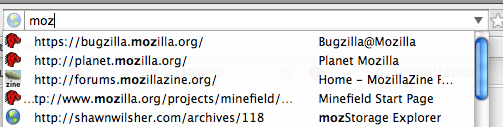
That’s not really too big of an issue because I happen to always go to those pages by typing other words: bugzilla.mozilla.org and planet.mozilla.org. However, if I wanted to visit mozillazine, Firefox puts other pages ahead of it. Every time I type “moz,” I only want to select the mozillazine entry. I want that entry to be the first result.
In comes AwesomeBar! 😀 That’s exactly what I’ve done for adaptive learning url bar autocomplete [bugzilla.mozilla.org]. Firefox will remember the text you typed and the page you selected, so next time when you give a similar input, Firefox will give a higher rank to those pages. It even matches partial inputs, so I can even type just “p” from planet, and Firefox knows to put that above other pages that just happen to also match “p”.
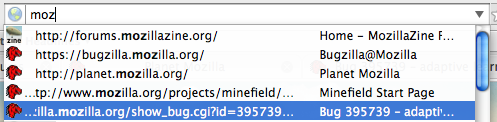
Continuing my example of bugzilla, planet, mozillazine.. The first time around, I type “mozillazine” and press down and enter to select the entry. Next time, when I type just “moz,” Firefox remembers that I selected forums.mozillazine.org and places it as the first result.
Assuming that I can convince some people that we should have this in Firefox 3, we can potentially get this in as early as Beta 2. There’s still a lot of opportunity for other adaptive techniques throughout Firefox, but even just looking at the AwesomeBar, there’s room to make it even smarter — adapting to shifting behavior. For example, Firefox has learned that you always visit planet when typing “plan,” but you’ve started doing development and now frequent xulplanet. Firefox could then realize it should give less ranking to planet.m.o and give more to xulplanet.
I’m sure others will come in and create great new adaptive techniques for Firefox. In the mean time, I’ll need to continue working on my Ph.D. research which happens to be somewhat related — making new adaptive compiler techniques that take advantage of key hardware features. 🙂
(Post date bumped up for planet.mozilla.org.)
45 Comments | Tags: AwesomeBar, Mozilla, Ph.D.
[…] adaptively learn how to sort the results. He’s got a really cool post about his work here that you should go read right now. It has pictures even! […]
It would be even nicer if FF doesn’t forget my URL’s anymore.
Secondly the boldface (or other indication) of where the match is in the autocomplete list makes it even more awesome.
[…] heavily on the new Places infrastructure, polishing and tweaking the “awesome bar” and other UI improvements making it easier to search your local history and bookmarks, as […]
[…] heavily on the new Places infrastructure, polishing and tweaking the “awesome bar†and other UI improvements making it easier to search your local history and bookmarks, as well […]
[…] One of the cool new UI enhancements related to Places is what’s being called the “awesome bar“. In Firefox 2 (as well as most other web browsers), when you type into the location bar, it […]
[…] heavily on the new Places infrastructure, polishing and tweaking the “awesome bar†and other UI improvements making it easier to search your local history and bookmarks, as well […]
Here is a little troll of some kind. One feature i’d love to see in FF 3: last folder used selected by default in the bookmark saving window. I mean, i ‘ve just been on that site i love so much and wanted to bookmark several pages… you must browse the full dam list to get your folder back up the list again… i switched to Safari (sorry, :-#)
I’m just so thrilled about the whole concept underlying FF i cry my soul out every time i find Safari easier
[…] overwhelming users with complexity, this is a huge release for us and the Mozilla community. Awesomebar, new mac theme (as an add-on), Places and one click bookmarking, progress on a new Linux theme, […]
[…] overwhelming users with complexity, this is a huge release for us and the Mozilla community. Awesomebar, new mac theme (as an add-on), Places and one click bookmarking, progress on a new Linux theme, […]
[…] mentioned the new “awesomebar” in a previous post. In short, it’s a modified autocomplete mechanism for the location […]
[…] dubbed it the “almighty bar” (another nickname on the path of ongoing transition to the “awesome bar”) which is a pretty great name for describing the […]
[…] ×”×חרון כמה ×‘×œ×•×’×™× ×©×‘×ž×“×‘×¨×™× ×¢×œ ×”-Firefox החדש, וספציפית על סרגל הכתובות החדש ×©×ž×•×¦× ×“×¤×™× ×‘×”×™×¡×˜×•×¨×™×” ×œ× ×¨×§ לפי התחלת ×”-URL. ×–×” ×כן ×ž×’× ×™×‘ […]
[…] scrivi sempre Open Space per andare sul forum di Multiplayer te lo darà come primo risultato, vedi qui). Tu adesso usi l’integrazione con il “mi sento fortunato” di google giusto?(scrivi una parola, dai […]
[…] the location bar or its autocomplete dropdown – the awesome bar changes will likely cause some code changes for […]
[…] the location bar or its autocomplete dropdown – the awesome bar changes will likely cause some code changes for […]
[…] been over two months since I first posted about the AwesomeBar [ed.agadak.net], and some of you have been able experience the power of the learning behavior. […]
[…] the work on the AwesomeBar [ed.agadak.net], I’ve noted before that getting relevant results [ed.agadak.net] in the […]
[…] Way to Awesome For the work on the AwesomeBar [ed.agadak.net], I’ve noted before that getting relevant results [ed.agadak.net] in the location […]
[…] been exactly four months since I first wrote about the AwesomeBar [ed.agadak.net], and how it would become awesome with adaptive learning, which makes Firefox give […]
[…] Awesome It’s been exactly four months since I first wrote about the AwesomeBar [ed.agadak.net], and how it would become awesome with adaptive learning, which makes Firefox give […]
it took me a while to start getting used to this, and I love it now.
this changes things. VERY nicely done.
[…] little useless capsule button? Not so useless anymore. And having the full awesome power of the AwesomeBar available on Cmd-L in a collapsed toolbar? I can’t even tell you how cool that […]
[…] little useless capsule button? Not so useless anymore. And having the full awesome power of the AwesomeBar available on Cmd-L in a collapsed toolbar? I can’t even tell you how cool that is. addthis_url = […]
[…] almost every way, but the most apparent and the most useful of all that I’ve seen so far is the new Location Bar, also dubbed the AwesomeBar by some of the Mozilla […]
[…] it plans to include in the future, like support for add-ons, support for web applications, an AwesomeBar, one-click bookmarking, and inertial scrolling – the last two of which are currently available in […]
[…] it plans to include in the future, like support for add-ons, support for web applications, an AwesomeBar, one-click bookmarking, and inertial scrolling – the last two of which are currently available in […]
Yea, Opera already does that…
[…] combining the AwesomeBar’s adaptive learning [ed.agadak.net] with the ability to start a Gmail search to find unread messages [mail.google.com] […]
[…] all the benefits of online bookmarking, while still having them available in Firefox – with all the AwesomeBar […]
FF 3’s address bar is nice, but I think Opera 9.5’s address bar is better.
[…] 3 comes with a bunch of nice new features. The one I like the most is AwesomeBar. It’s just… awesome! Go and grab your free copy today and give it a […]
[…] sounds great, except that the AwesomeBar and search bar can end up actually being more distracting than useful. The default Gutsy animations […]
[…] Smart Location Bar, or AwesomeBar as it’s colloquially termed, has to be the biggest advance in Firefox 3. The Smart Location […]
Do you people ever look at things from another angle?!?
What if one day you start your car and shifting into 4th gear puts it in reverse instead?!? Oops sorry, car manufacturer has released an update last night which changes the default behavior of your transmission to the new, improved behavior.
I already wrote on my website how some UI changes should not be forced like this one. I said:
“If you are serious developer you don’t make such a drastic UI change a new default. You make an option and allow people to switch it on if they want.”
“Going to about:config, finding out about option.this.and.that and figuring out proper numerical value for restoring previous default behavior is not something I enjoy doing after my browser gets updated automatically. It is a waste of time and it should be a checkbox in preferences.”
You are breaking two serious UI rules here:
1. Do not force the option which involves changing user’s habits to be the new default
2. Do not introduce new behavior without having an easily accessible way to fully revert to the old behavior.
While you are spouting how awesome this crappy change is, many people do not agree and want it gone ASAP because they worked efficiently without it and now have to waste time adapting themselves.
Here check it out for yourselves:
http://support.mozilla.com/tiki-view_forum_thread.php?locale=sk&comments_parentId=37784&forumId=1
I mean how retarded you must be to include bookmarks in location bar search?!? If I had it bookmarked I would have clicked it, not searched for it for God sake!
So, back to the drawing board — release Firefox 3.1, get rid of that AwesomeCrapBar by default and leave the option in preferences to turn it on for those who actually want it.
[…] upgrade time. Over 300 memory leaks fixed, better security, more speed, the “awesome bar” are a few reasons to upgrade. MORE HERE. Possibly related posts: (automatically […]
[…] 3’s Smart Location Bar learns to show you the page you want when you type in some search terms. In many cases, it already knows […]
Fully agree with Igor. This “awesome” bar is anything BUT awesome. It took me several tries to get the thing to act the way I want it to act. I have favorites/bookmarks for a reason, I don’t need it to show up in my address bar. Get rid of this thing!!!!
[…] in line with the potential domain names that could match your query. Hopefully, Firefox 3’s AwesomeBar will provide similar functionality sometime soon (maybe another FF plugin already does?). And if […]
The so-called “Awesome Bar” is a flaming turd that should’ve been flushed down the commode of invidiousness a year ago.
At least it’s capable of being disabled.
[…] it plans to include in the future, like support for add-ons, support for web applications, an AwesomeBar, one-click bookmarking, and inertial scrolling – the last two of which are currently available in […]
[…] public links >> designpatterns SmartBar to AwesomeBar | edilee Saved by thousandmiles on Fri 31-10-2008 Podcast & New VizThink Europe Facilitator: Christian […]
I agree, that bar is awesome. My only problem is that when I use Firefox 3 on my old PC with 512 MB of RAM, it lags and trashes my HDD like hell. I have a huge history of visited sites so I guess it takes a while for it to search through.
[…] with features like multi-word search (just press space — great for matching titles) and adaptive learning (you’ll only need to type a single letter to get what you want). I even wrote an add-on that […]
[…] able to find my passion of helping people. In between lectures, I hacked on open source Firefox to create the AwesomeBar through many iterations of conversing with individuals to learn about their specific needs. I […]
[…] Features include Personas and the AwesomeBar […]