4 February 2009 - 7:20Firefox 3.5 Location Bar Privacy

Thanks for installing/upgrading Hide Unvisited. This latest version is only for Firefox 3.5 and leverages the built-in privacy functionality of Firefox 3.5, so you don’t even need the add-on anymore. The add-on has already automatically uninstalled itself and set the preference as described below for you. :) But if you want another add-on to try, check out Enter Selects — pressing enter from the location bar will now automatically go to the first result.


User Privacy has made big steps with Firefox 3.5. First off it’s very simple to clear out the last hour of online shopping, medical researching or media browsing with “Clear Recent History.” This is much smarter than wiping out your entire history or not letting Firefox track any history just to prevent some pages from showing up in the Location Bar. Another big privacy feature is Private Browsing Mode [support.mozilla.org] (Panic Mode? ;) ), which starts a new browsing session where Firefox won’t track any history until you leave that mode.

Both these features affect the Location Bar because removing pages from your history stops you or someone else using Firefox and accidentally finding those pages when typing in the Location Bar.

One slight caveat is that by default, Firefox will suggest bookmarks from the Location Bar because you’ve added a star to the page and probably want to revisit it. This means even if you clear your browsing history, bookmarks will still show up when searching for pages.
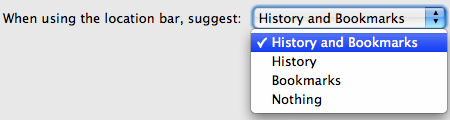
Choose what Firefox 3.5 can suggest from the Location Bar

Choose what Firefox 3.5 can suggest from the Location Bar

Firefox 3.5 adds a new drop-down menu in the Privacy view when setting your Preferences. Here you can tell Firefox to only search “History” instead of the default of “History and Bookmarks.” This means if you use a bookmark and remove traces of visiting the bookmark, it won’t show up in the Location Bar until you revisit that page you bookmarked.

On a related note of only showing pages you’ve been to, Firefox 3.5 will only suggest pages that you’ve typed in the Location Bar when clicking the drop-down button. This means the 12 sites that appear in the list are those that you frequently use to start browsing. Similarly, Auto Dial 6 has been updated to only show pages you’ve typed. These two make great ways to go back to sites that you launch from.

Two launch-points to get you started in just a couple clicks

Two launch-points to get you started in just a couple clicks

If you want more advanced control of the Location Bar behavior, check out Firefox 3.5 Location Bar Preferences.

69 Comments | Tags: Add-on, AwesomeBar, Mozilla

Comments:

  1. [...] For those comfortable with twiddling around with about:config, there are several new preferences to play with since Firefox 3. (If that sounds scary, check out my other post about Firefox 3.1 Location Bar Privacy.) [...]

  2. Black says: 20 Feb 2009 - 8:08

    What about to disable the bookmark all the time to not display any page..can you please help me out

    Thanks

  3. Everytime I open Firefox 3.5 beta 4 this page loads?? I checked my homepage settings and it is not located there… can you assist??

  4. Everytime I open Firefox 3.5 beta 4 this page loads??

    Restart your browser to finish uninstalling Hide Unvisited.

  5. Christophe says: 01 Jun 2009 - 5:18

    Dear Ed,
    I have the same problem as Shawn (09-05-19, 10:37). It’s not that I uninstalled it (or that I wish to), it just pops up everytime I open FF 3.5b4, in fact it opens everytime I open a new window.
    Greetings

  6. Anthony Gomez says: 01 Jun 2009 - 8:51

    I am having the same problem. This site pops up each time I open my Google Bookmark, and when I open my FireFox it launches the welcome screens for all the new/updated addons I have installed since installing the newest beta FireFox 3.5. Not only is this ANNOYING but it takes my browser a lot longer to load.

    Please advise.

    Anthony Gomez

  7. Anthony Gomez says: 01 Jun 2009 - 8:56

    Here is another problem with the Google Bookmarks. When I click on the Google Bookmark icon it suppose to launch a intro windows about the bookmarks, then it has an “ok” button that causes the window to shut down. It launches the pop up window but it has two tabs, 1 with the bookmark intro window and the the other about this site. I then have to manually have to close the window. When I click on the bookmark sign in button (appears after the initial intro windows disappears) it launches another pop window (which it is supposed to do) but with 2 tabs again, the sign in tab and this site tab. This becomes double anoying.

  8. It’s not that I uninstalled it (or that I wish to)

    The add-on should be uninstalling itself. It’s no longer needed as its functionality is built-in to Firefox 3.5. If you look at the add-ons list From Tools -> Add-Ons, does it show that Hide Unvisited is going to be uninstalled after you restart Firefox?

  9. This site pops up each time I open my Google Bookmark

    What do you mean by “open your google bookmark”? Does it open in a new window by default? What happens after you restart Firefox or manually uninstall Hide Unvisited?

  10. http://ed.agadak.net/2009/02/firefox-31-location-bar-privacy; This url opens automatically every time I open Firefox 3.5.b99. I have my settings to not remember anything at all so as to wipe out my entire browsing history when I close Firefox, and every thing works except for the aforementioned URL. It opens in a new tab. I never installed hide.unvisited.

  11. This url opens automatically every time I open Firefox 3.5.b99… I never installed hide.unvisited.

    The only instances of “ed.agadak.net” in the Firefox codebase are in unit tests, and the only thing that I’ve hardcoded to this page is through a version of my Hide Unvisited add-on that only installs on Firefox 3.5.

    So perhaps somewhere along the way you had Hide Unvisited installed/installed for you, but if you are loading this page, it should have uninstalled itself. You can double check in your Tools -> Add-Ons -> Extensions window.

  12. Victoria I. Leonard says: 18 Jun 2009 - 9:27

    Is there a way to bring 3.5 to work like 3.0 when clicking the drop-down button?

  13. Is there a way to bring 3.5 to work like 3.0 when clicking the drop-down button?

    What do you want in the drop-down that isn’t working as you expected in 3.5? The drop-down in 3.5 will still show your history like before, but it’ll now only show things that you’ve typed in (like Firefox 2). After using Firefox 3.5 for a little bit, it should be showing what you expect.

  14. Victoria I. Leonard says: 18 Jun 2009 - 13:00

    Well, this is really a simple answer. I was one of the people not complaining about the changes in 3.0. And in will not complain about 3.5. Its the way the designers want it, and thats ok for me. I am flexible. But the Problem in my case is, i never type in any Adresses. And Adresses that are auto-completed does not apear in the new list.
    In Fx 3 the list was a kind of “most visited” sites. I know that the goal was to make 3.5 like 2.0. You asked what I expected: a system like in 3.0.
    Is there a way to get this?
    It is not really a big problem, but it would be nice.

  15. Heranto says: 23 Jun 2009 - 19:25

    Everytime I open firefox 3.5RE with “http://ed.agadak.net/2009/02/firefox-31-location-bar-privacy” open itself in new window. How to turn it off?

  16. i never type in any Adresses. And Adresses that are auto-completed does not apear in the new list.

    “Typed” is slightly a misnomer as results that you select from the location bar are also considered “typed”. So if you type a single letter and click the result, it will be shown next time (probably higher up as well).

    You asked what I expected: a system like in 3.0.

    How often do you expect the list to change? If you type the first letter of a site that you go to and select it from the list, it’ll appear in the drop-down list (without any typing) in the future. That should be just like what you used in Firefox 3.

  17. Diego says: 02 Jul 2009 - 8:50

    Help…I’m really frustated with the awesome bar. I just upgraded to FF 3.5 and just can’t make the location bar to work right. With FF 3.0 (3.1?, don’t remember) I had the Hide Unvisted and Oldbar add-ons and that was working fine, but with 3.5 it keeps showing some bookmarks that I haven’t typed. I have gone to about:config and tried the settings you mention but nothing works. In browser.urlbar.default.behavior I have tried 1, 17, 49 and nothing works…I can’t believe I’m thinking in going back to IE just because of this horrible, horrible “awesome” bar….please, please, HELP!!

  18. with 3.5 it keeps showing some bookmarks that I haven’t typed

    If you go to Preferences -> Privacy -> Location Bar, does the drop-down show “History”?

    If you have that selected, you shouldn’t be getting any stars in the location bar indicating that it’s a bookmark. However, if you do use a bookmark, it’ll be in your history because you’ve just visited it, and the location bar will show your history (but not indicate it’s a bookmark).

    If you would like to get rid of the trace of that visit, you can either first enter private browsing (Tools -> Start Private Browsing) then use the bookmark. Or just use the bookmark and erase tracks of the visit by Tools -> Clear Recent History to clear say… the last 4 hours of browsing.

    One last way to clean your tracks is to look through your History Sidebar, right-click the page you want to remove, and select “Forget about this Site”.

  19. I just updated to FF version 3.5.

    Preferences -> Privacy -> Location Bar is set to “History”

    If I clear all history, restart FF and type a letter in the addressbar, then FF finds hits from my already cleared history.

    Something I overlooked?

  20. Gervais Brisson says: 06 Jul 2009 - 19:59

    Est-ce possible d’obtenir cette page en français?

  21. Firefox 3.5 a amélioré la confidentialité, vous n’avez donc pas besoin de Hide Unvisited.

  22. Wallis says: 08 Jul 2009 - 15:28

    I installed your add on and now when my browser opens I get two tabs, one my home page and the other, this “edilee” page. No offense, but how do I keep this page from loading every time I launch FF?

  23. You stupid fag mother fucker why did you coded this to fucken open your site stupid inbred fock!

  24. Your addon fucking loads this stupid tab everytime I open my browser.. I am uninstalling it..

    its garabage.. but used to be good untill this bullshit

  25. Give me back the old release. 3.5 is not user friendly for sure.

  26. firefox 3.5 sucks! Since I got this version I have trouble with bookmarks showing up in the URL-bar. I have tried EVERYTHING and there is nothing to do. Me too consider using IE instead until something better on market shows up.

  27. D. Moore says: 16 Jul 2009 - 5:53

    How do I stop your website from loading everytime I open Firefox up…it is extremely annoying.

  28. I have trouble with bookmarks showing up in the URL-bar

    Did you try changing the Preferences -> Privacy -> Location Bar ->
    Suggest “History”. By default it’s “History and Bookmarks”. Now only
    pages that you visit will show up in the location bar.

    Also, there’s plenty of ways to maintain your privacy such as Private
    Browsing, Clear Recent History, and Forget about this Site.

  29. Ed, I have tried that too – even reinstalling a couple of times.

  30. SJL, you’re right. It can be so smart that it ends up with problems. I look forward to a more userfriendly Chrome from Google. Then I’m finish with firefox.

  31. Seriously!
    This page comes up in a tab everytime FF is opened. Several people have reported it. How can this be stopped???

  32. HOW DO YOU TURN THIS OFF….IT KEEPS POPPING UP WHEN I START THE WEB.

  33. blopblop says: 22 Jul 2009 - 2:58

    cool

  34. Have you tried this:
    Uninstall that shit and find something more clever!!

  35. soße says: 23 Jul 2009 - 6:18

    nja mich stört nur das die seite hier immer wieder aufgeht und das ich immer wieder nach einer youtube seite mozilla beenden kann, dann cache löschen und wieder mozilla neustarten darf….

    der rest ist spitze

  36. Firefox 3.5 hat bessere Privatsphäre, so dass Sie nicht brauchen Hide Unvisited. Bitte deinstallieren Sie das Add-on.

  37. Open your addon page and click restart to complete changes. Worked for me.

  38. If you want to feel fre of this shit go and delete.

    C:\Users\YourUserName\AppData\Roaming\Mozilla\Firefox\Profiles\ni4qgwnm.default\extensions\hide.unvisited@agadak.net\hideUnvisited.xul
    C:\Users\YourUserName\AppData\Local\Mozilla\Firefox\Profiles\ni4qgwnm.default\Cache\_CACHE_001_

    Robby

  39. It opens this page for me too.. no thanks, I’m using something else from now on.

  40. Richard says: 09 Aug 2009 - 21:28

    Two questions about book marks: why did I lose most of them when I installed the 3.5 Firefox this week, and why can’t I delete some bookmarks on the drop down bookmark thing?

  41. Steven says: 12 Aug 2009 - 17:38

    What settings did this change so that I can go back and fix them? You’ve got a lot of people who are now screwed thanks to this add on. Either give us a fix or tell us how to fix it.

  42. What settings did this change so that I can go back and fix them?

    What settings are you talking about? What needs fixing?

    The only preference Hide Unvisited 3.5 sets is in the Privacy preference window to have Firefox suggest “History” instead of “History and Bookmarks”. And those installing Hide Unvisited didn’t want unvisited bookmarks from showing up, so I don’t see what’s wrong with changing that preference.

  43. Steven says: 12 Aug 2009 - 17:54

    Ed, this page pops up every time when starting Firefox. The cache (history) gets cleared every time firefox is reset. I’m using Firefox 3.5.2.

    What about:config settings got changed with the add on? Was there any other changes?

    There are a ton of comments mentioning this page popping up every time they start Firefox. Why do you still have your add on listed officially through Mozilla when you know it is not compatible with 3.5?

    The add on is uninstalled. Perhaps something got bullocked in the auto-uninstall sequence.

  44. Hey, thanks for the feedback Steven. I’ve updated Hide Unvisited 3.6:
    https://addons.mozilla.org/en-US/firefox/addons/versions/7429#version-3.6

    It now correctly auto-uninstalls itself if the user never had a previous version of Hide Unvisited installed. I wrote version 3.5 assuming only people that used it with Firefox 3 would upgrade to Hide Unvisited 3.5.

    As an extra bonus, I added some extra checking code so that this page will only open once instead of simply opening this page when you open a Firefox window. So even if you don’t get to restarting Firefox right away after uninstalling, this page shouldn’t keep popping up.

  45. Steven says: 12 Aug 2009 - 18:32

    Ed your link still goes to 3.5.

    Yes I installed without having a previous version. When I was searching for how to change the awesome bar in Firefox 3.5 I found several links for your add on. Forgive my earlier attitude. I am just frustrated with the problems.

  46. Steven says: 12 Aug 2009 - 18:37

    Oh and not only does this page pop up when starting Firefox but it opens with every new window.

  47. Hey all, it seems like AMO was having issues and broke my 3.6 version, so I reuploaded it as 3.6+. It should be the top link, but it’ll be labeled as experimental until an AMO editor approves it.
    https://addons.mozilla.org/en-US/firefox/addons/versions/7429#version-3.6+

    I’ve you’ve already uninstalled Hide Unvisited, there’s no need to re-install it. So sorry for not making sure it correctly uninstalled itself if you didn’t upgrade from an earlier version of Hide Unvisited.

    But the newest version should now correctly uninstall itself and even restart Firefox for you. And if you manage to open multiple windows before the restart, Hide Unvisited will only open a tab to this page once.

  48. How do you remove Edilee from Firefox?

  49. When I have a Valid Window open, when I click on the direction, advice I was given. The window empties, but remains open. I have to manually close the winter to move on……
    Frustrating

  50. GOOOOOD

  51. Deleted the Hide Unvisited and now just use the Private Browsing selection under tools. I like FF, but some other boilerplate features become e-torture.

  52. Can you please clarify as to how to get rid of the linking to your blog. 3.6+ is down.

  53. DN, you’ll need to uninstall Hide Unvisited by going to Tools -> Add-ons -> Extensions -> Select Uninstall for Hide Unvisited.

  54. Now whenever I start firefox, it always opens the tab titled “Firefox 3.5 Location Bar Privacy”. How do I get rid of this? I want it to go to my home page and I don’t want to see this additional tab.

  55. Bruno says: 18 Aug 2009 - 0:46

    I dont want to see THIS page again??

    How can I do it????????????????????????

  56. Richard Eich says: 18 Aug 2009 - 15:47

    Why the (**&* does this page show up every time I start Firefox?

  57. christine says: 18 Aug 2009 - 17:24

    WHY does this page keep popping up for me?!!? It’s beyond annoying. Please fix this problem. I like the add-on but I hate seeing this page repeatedly.

  58. Peter says: 19 Aug 2009 - 1:25

    Get this page off my screen nooooooooooooooooooooooooooooooow!!!!!!!!!!!!!!!!!!!!!!!!!!!!!!!!!!!!!!!!!!!!!!!!!!!!!!!!!!!!

  59. Dierk says: 20 Aug 2009 - 6:53

    Dierk says: Show me wy to get not this fuckin’ blob on my screen everytime i’m starting Firefox!

  60. Dierk says: 20 Aug 2009 - 6:56

    Sorry, there are failures, the right comment is:Show me way to get not this fuckin’ blog on my screen everytime I’m starting Firefox!

  61. PoBob says: 21 Aug 2009 - 2:20

    Apparently Im having the same problem that has persisted for three months. Every time I start a page, this page loads? I would uninstall “hide unvisited” if I could find a way. Having to download a “plug-in” that actually deletes your browsing history when you try to delete your browsing history is kind of a pain the ass to start with. The version that I had before I had to reformat my machine worked just fine. Dammit. Im trying to work here, not have fun hours trying to fiddle with my software.

  62. PoBob says: 21 Aug 2009 - 2:21

    I have also attempted to download 3.6 and 3.6+, but the link seems broken. At least, nothing happens.

  63. PoBob, if you’re using Firefox 3.5, you can go to Preferences -> Privacy -> Suggest History to have Firefox not show unvisited pages.

    3.6+ should be available here:
    https://addons.mozilla.org/en-US/firefox/downloads/file/61755/hide_unvisited-3.6+-fx.xpi?confirmed

    The reviewers at AMO are working to catch up with the backlog of addon reviews, so you need to jump through some more hoops to get to 3.6+

  64. Hide Unvisited 3.6+ seems to be consistently showing up on addons.mozilla.org now. Unfortunate that it took so long to get approved, but those who were stuck with 3.5 should have already automatically upgraded to 3.6+ that correctly uninstalls itself and doesn’t open this page more than once.

    You can manually get it here if you want:
    https://addons.mozilla.org/en-US/firefox/addon/7429

  65. Groschopp says: 06 Sep 2009 - 7:54

    gut zu wissen

  66. I just installed firefox 3.5 and have been playing with the preferences but one thing I’m finding really annoying is that everytime I open a new session or hit the home button, a random session I had earlier (4 tabs with various websites) opens, as if firefox thought it crashed and restored my old session but without asking me if that’s what I’d like. This could be really annoying when using my mac in a public place. Is there a way to disable this? If not where can I get my old firefox back?

  67. thanks for letting me no about my updates to my computer

  68. creative_p says: 29 Jan 2010 - 18:29

    Thanks 4 the information

  69. Morris says: 04 Aug 2010 - 15:47

    Hello

    Try as you may, with all the tech language, you do not answer the question:

    What can I do so this page does not open up at all.

    Just the facts please. Click this….Press that…

    I do not care if I have this update or not. I just do not want this page to open before I can actually access Firefox.

    Thank you.


Add a Comment