19 January 2008 - 10:04Another Way to Awesome

For the work on the AwesomeBar [ed.agadak.net], I’ve noted before that getting relevant results [ed.agadak.net] in the location bar to select is important before the adaptive behavior is useful.

A friend of mine pointed out that if he knew multiple words in the title, typing both resulted in no results instead of seeing some results if he typed a word individually. This is because Beta 2 tries to match the whole input against either the title or url of a page.

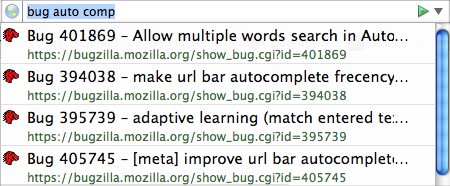
bug auto complete

Drilling down results with 3 words matching the title

Instead of getting rid of all those good results, we can treat each word separately and match them in different places in the title. This lets the user incrementally filter out results by typing words s/he see from the current results.

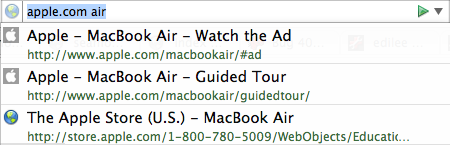
But what if you knew the domain and a word in the title? No problem! 😀

apple.com air

Matching the url and title at the same time

Here’s some builds that you can use to test things out: Win32 zip (installer exe), OS X dmg, Linux tbz2 [build.mozilla.org].

These include the incoming changes for “global frecency” as well as adaptive learning. So as an additional bonus, the browser will learn which pages you’ve selected after drilling down and show it first the next time — even when you’ve only typed the first word. (I haven’t changed the UI, so it doesn’t show which words matched, but the results will be there.)

There has been plenty of work by developers to get the results to show up immediately, so comments on performance are appreciated. 🙂

Edit: I just realized things might be initially slow because of the “global frecency” migration for existing profiles. So if you don’t do anything in the browser.. leave the room, grab a drink for a few minutes, things should go faster after it calculates some frecencies for your pages.

11 Comments | Tags: AwesomeBar, Mozilla

6 January 2008 - 7:42Not Just Awesome

It’s been over two months since I first posted about the AwesomeBar [ed.agadak.net], and some of you have been able experience the power of the learning behavior. Frequently visited sites are easily accessed with just a single letter. These “automatic bookmarks” bubble up to the top of the location bar autocomplete list just after selecting a result once.

However, I noticed that the list contained many “random” results below the adaptive learning results for these single-letter-bookmarks. Looking at the highlighted portions, they would be in the middle of words and all over the url. Or in the case of ‘p’, the list would contain pages that matched http which isn’t too useful when searching.

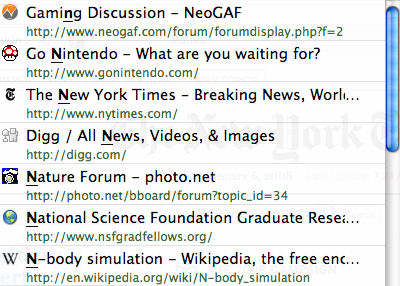
Confused match

Random results for ‘n’ (or ‘p’) in Beta 2

The adaptive learning won’t be useful if the user can’t find anything of interest to select out of the list. Sure, one could keep typing and typing to filter out more pages and find something specific, but that requires typing more.. (and people are lazy! 😛 )

So I decided to improve the quality of the pre-adaptive results [bugzilla.mozilla.org]. Now matches near the beginning of the title or on word boundaries (and ends of words) are given preference. The same applies to the url, so matches near the front (like the domain) are preferred as well. Matching more helps as well, so top level pages are preferred over sub-pages with long, mysterious ?queries. 🙂

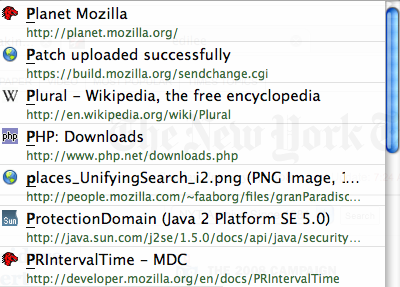
Awesome p match

Preference for matches near the beginning

However, even with smarter matching of the title or url, the ordering might not be the one you want. Perhaps you have a page with the same title on the internet and locally for development, and you want one over the other. Only so much can be done without making things overly complex and slow, so that’s where the adaptive learning can fill in the gap.

There are builds available for people to try: Win32 zip (installer exe), OS X dmg, Linux tbz2 [build.mozilla.org]. These contain the changes for smarter matching results as well as the adaptive learning.

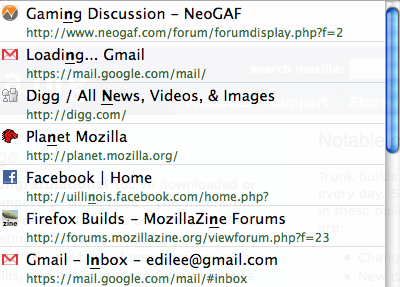
Adaptive n match

Adaptive results up top in addition to smarter matching
(The highlighted portion doesn’t necessarily correspond to the smart-matched portion.)

So hopefully with these combined, people will need only to type a fewer letters to find a page they want initially and then type a single letter to find it again. (Are people lazy or am I making them lazy? .. I mean efficient! 😀 )

9 Comments | Tags: AwesomeBar, Mozilla

2 December 2007 - 17:571 Potato, 2 Potato, 3 Potato, 4

I’ve been working on a bug to better display the download time remaining [bugzilla.mozilla.org] because right now it only shows either seconds or minutes. Not too useful for really long downloads (but friendlier than the hh:mm:ss of Firefox 2).

It’s gone from 1) the current seconds/minutes display to 2) displaying fractional times for seconds/minutes/hours/days to 3) whole times with pairs of sub-units to 4) figuring out how to implement features from the upcoming l10n v2 (l20n) [wiki.mozilla.org] because we don’t have them now.

In particular.. how to correctly display plural forms of words for various numbers. In this case, 1 day vs 2 days.
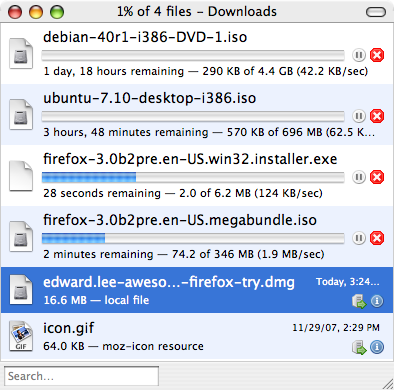
Firefox 3 Download Times

Downloads with 2 time units and their correct plurals

English is fairly simple with just 2 plural forms: a singular one for 1 and a plural one for everything else. (Asian languages are even easier! Everything is plural or singular.. however you want to look at it. 😉 )

Turns out some other languages aren’t so easy.

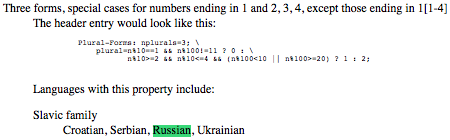
Russian has 3 plural forms: a singular form for values ending in 1 like 1, 21, 31, 41.. except 11; a special plural form for values ending in 2, 3 or 4 but skipping 12, 13, 14; and a common plural form for everything else (5-20, 25-30..).

There was some discussion about what to expose to the localizer as in how to specify which values need which plural forms. Enumerate all desired values and parse? Give a javascript expression and eval? Come up with a regular expression and execute?

Eventually Zbigniew (gandalf) provided a useful link to GNU’s gettext utility [gnu.org] that lists 11 rules of shared plural forms such as a single plural form for the Asian and Turkic family; and two forms exactly like English’s for the Germanic, Latin/Greek, Semitic, etc. families.
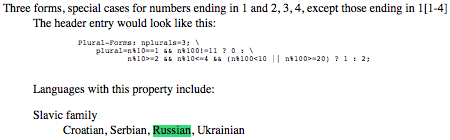
gettext for Russian

gettext‘s rule for Slavic/Russian-like languages

The list seemed pretty comprehensive, so I figured why not just implement those 11 rules and have localizers pick the matching rule number and then fill in the appropriate plural forms of the words.

At first I also provided a way to allow custom rules, but now I’m thinking about backing away from that. This would keep things much simpler — localizers wouldn’t worry about the special procedure to use a custom rule and wouldn’t need to create a rule that perfectly matches the language.

For example, if a language that’s almost-like-Russian where the plural forms are the same except 11 is singular, that localizer would just use the same rule for Russian as that’s the closest match. It’s not ideal, but the users in that language would still understand what the download was trying to inform them. And for the common case of all the other values, the plural forms match up perfectly.

The last task to be done is informing the localizers on how to make use of this system. This will probably involve linking to the l10n wiki with some simple instructions for picking out the appropriate rule and filling in the plural forms of the words.

A rule entry on the wiki would let the localizer know how many plural forms there are, which languages use it, and what each form means similar to the gettext page. Additionally it would have a list of sample values that match each form to be totally explicit.

Plural rule #1 (2 forms)
Families: Germanic (Danish, Dutch, English, Faroese), Finno-Ugric (Estonian, Finnish), …
is 1: 1
everything else: 0, 2, 3, 4, 5, 6, 7, 8, 9, 10, 11, 12, 13, 14, 15, …

Plural rule #7 (3 forms)
Families: Slavic (Croatian, Serbian, Russian, Ukrainian)
ends in 1; not 11: 1, 21, 31, 41, 51, 61, 71, 81, 91, 101, 121, 131, …
ends in 2,3,4; not 12,13,14: 2, 3, 4, 22, 23, 24, 32, 33, 34, 42, 43, 44, …
everything else: 0, 5, 6, 7, 8, 9, 10, 11, 12, 13, 14, 15, 16, 17, 18, …

So to localize the strings for the download manager, someone doing English would scan the list and find Rule #1 with the appropriate plural forms and localize the strings for “seconds”, “minutes”, etc. matching the order of the plural forms listed under the rules.

pluralRule=1
seconds=second;seconds
minutes=minute;minutes

potatoes=potato;potatoes 🙂
1 Comment | Tags: Mozilla

4 November 2007 - 20:50SmartBar to AwesomeBar

One of the most useful features in Firefox 3 is the smarter location bar which now selects pages from your history and bookmarks if your input matches any part of them. For comparison, Firefox 2 would only match the beginning of the URL – typically the domain name.

Firefox 3 Smart Bar

Firefox 3 searches text from the URL and title

When the “smart” bar first landed, I was somewhat disoriented because I was so used to typing domain names to browse history and Firefox didn’t give those results back. For example, I would type “en” (for en.wikipedia.org) but get random results that happened to match “component,” “en-US,” “engineering,” etc.

There were some changes to the location bar to help address these issues, but more importantly, I soon learned to use it by typing in words from the middle of the URL or title. For example, I now type the course number 426 [cs.uiuc.edu] instead of typing out the whole “cs.uiuc.edu…” and scrolling down to pick that one out of the other classes that show up in my history. I can’t even use Firefox 2 in the computer labs anymore because it doesn’t have the “SmartBar” — others share [dietrich.ganx4.com] this same experience [blog.mozilla.com]. 😉

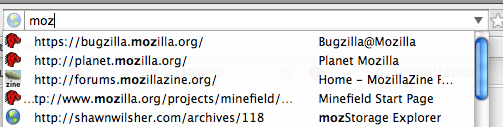
While the SmartBar is pretty smart, it can get confused sometimes. It currently ranks the results based on how often you’ve visited that page, so if you visit bugzilla.mozilla.org every day, typing any letter that matches the page will have it ranked first. This is fine by itself, but if you happen to visit other pages like planet.mozilla.org but not as frequently as bugzilla, Firefox will place bugzilla above planet if you type “moz”.

Firefox 3 Confused Bar

Bugzilla is placed over other pages because it’s most frequently visited

That’s not really too big of an issue because I happen to always go to those pages by typing other words: bugzilla.mozilla.org and planet.mozilla.org. However, if I wanted to visit mozillazine, Firefox puts other pages ahead of it. Every time I type “moz,” I only want to select the mozillazine entry. I want that entry to be the first result.

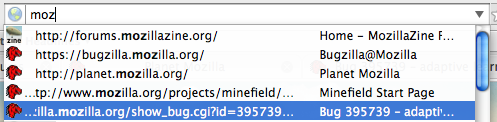
In comes AwesomeBar! 😀 That’s exactly what I’ve done for adaptive learning url bar autocomplete [bugzilla.mozilla.org]. Firefox will remember the text you typed and the page you selected, so next time when you give a similar input, Firefox will give a higher rank to those pages. It even matches partial inputs, so I can even type just “p” from planet, and Firefox knows to put that above other pages that just happen to also match “p”.

Firefox 3 Awesome Bar

Firefox 3 could predict what you want with feedback-driven adaptive learning

Continuing my example of bugzilla, planet, mozillazine.. The first time around, I type “mozillazine” and press down and enter to select the entry. Next time, when I type just “moz,” Firefox remembers that I selected forums.mozillazine.org and places it as the first result.

Assuming that I can convince some people that we should have this in Firefox 3, we can potentially get this in as early as Beta 2. There’s still a lot of opportunity for other adaptive techniques throughout Firefox, but even just looking at the AwesomeBar, there’s room to make it even smarter — adapting to shifting behavior. For example, Firefox has learned that you always visit planet when typing “plan,” but you’ve started doing development and now frequent xulplanet. Firefox could then realize it should give less ranking to planet.m.o and give more to xulplanet.

I’m sure others will come in and create great new adaptive techniques for Firefox. In the mean time, I’ll need to continue working on my Ph.D. research which happens to be somewhat related — making new adaptive compiler techniques that take advantage of key hardware features. 🙂

(Post date bumped up for planet.mozilla.org.)

45 Comments | Tags: AwesomeBar, Mozilla, Ph.D.