8 April 2008 - 8:53Awesomeness in Beta 5
I’ve been busy preparing for a conference talk, so I didn’t get around to reporting AwesomeBar improvements for Beta 5 sooner. (But for those curious, I presented Branch-on-Random [pdf, uiuc.edu] at CGO 2008 [cgo.org] (Code Generation and Optimization). Basically, it’s an instruction that’s really cheap to implement and allows for a factor of 10 times less overhead than traditional sampling techniques. I think it went well, and I even got asked during Q&A.. “When can I buy one of these?” 🙂 )
As we’re winding down to ship Firefox 3, there aren’t as many more big features, but there’s still some useful changes in Beta 5 in terms of functionality, display, and performance. So those of you who have installed extensions to make the auto-complete smaller might want to turn it off to try out the new look.
Functionality
To better accommodate people’s expectations of results in the auto-complete, there are frecency tweaks to better prefer pages you’ve typed — by default, before adaptive learning. This helps address concerns that the top level site’s main page should appear high in the list because typically people are typing in the domain.
Another common complaint is that results seemed to be returning useless results when typing 1-2 characters. This stemmed from results being matched in the middle of words instead of at the start of the domain, for example. The adaptive learning helps avoid this problem because you’re typing words and selecting results that matched the word you wanted. The learning system then knows to show that selected page over others when you just type a single letter of the word — effectively showing a result that matches at the beginning of the word.
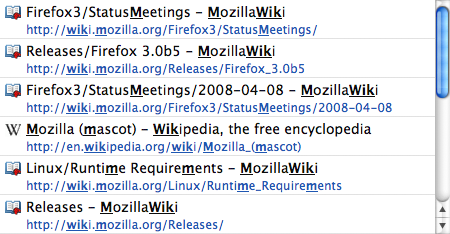
So to improve things for Beta 5, words that you type in the location bar will try to match on word boundaries e.g., matching after a forward slash or space. This even works for CamelCase (capitalizing the first letter of words instead of putting spaces) which is common for wikis.
Display
The first thing people will probably notice is that the list doesn’t feel as overpowering anymore. The number of results shown on the screen has been reduced to 6. Additionally the font size of the title text is smaller which felt unnecessarily large on some platforms like OS X. Ideally, the fewer number of results will help users scan results quickly instead of feeling overwhelmed. Combined with better functionality of multi-word search, adaptive learning, and word boundary matching, finding the page you want should be a happy experience. 🙂
Another set of changes is for how words you type get emphasized. Instead of only showing the first match in the title and url, it’ll emphasize all matches. Additionally, it’ll show matches when you type multiple words as well, so each word gets emphasized instead of nothing at all. For browser skin designers, there’s a new css class to alternatively emphasize matches, but the main purpose is to avoid styling bold which breaks common ligatures in some languages.

Performance
There has been improvements in browser responsiveness in Beta 5, so now it no longer eats up all of your CPU power for every letter that you type. In Beta 4, every single letter you typed caused the browser to start searching through your whole history
To optimize for users typing letters one by one for a whole word, we now reuse the results that are currently being shown in the list as well as continuing the search from where the last one left off. This has 2 main effects outside of reduced CPU usage: 1) existing matching results show up immediately instead of disappearing momentarily then reappearing and 2) not-as-frecently visited results can be found faster as you continue to type.
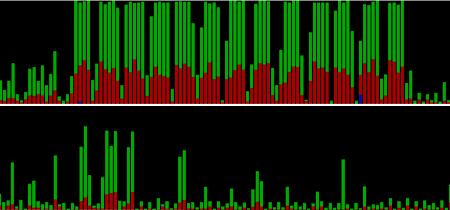
The picture shows a CPU usage graph where high bars means the CPU is doing a lot of work (and potentially not letting it update the UI). The horizontal axis is time and each set of 5 bars shows the 5 seconds after typing a letter one by one. So comparing the two graphs, we find the same results with a lot less work.
As an informal poll, I was wondering how many people are using the unofficial tryserver builds that I’ve been making. There’s some features like showing keyword searches, restricting searches, etc., that might not make it into Firefox 3 final, but I could potentially start a build near ship time, so you can get Firefox 3 + some extra awesomeness.
15 Comments | Tags: AwesomeBar, Conference, Mozilla
Poll answer: I at least try out pretty much every tryserver build, flip back and forth between them and recent trunk. Don’t exercise a lot of the features much, since what I want seems to be there without them.
It seems like the awesome bar is capable of pretty much everything needed for searching in the Organizer. Is there any code re-use potential? Since Advanced Search is currently MIA, anyway?
I’m very interested in the keywords and filter character features in bugs 392143, 395161. Currently it’s often hard to go to an unvisited bookmark, as the urlbar matches a slew of other history stuff. Being able to add “*” to the search seems valuable to me!
[…] best news is that in Firefox 3 Beta 5, they have cut down a lot in the CPU power that is used when searching via the bar of […]
I have changed the way I use FF to use AB and the new places stuff… like it a lot.
I like the way bookmarks are searched but would like the folder that the bookmark is in and tags to be searched as well.
SilverWave: Check out tweez. It’s a Firefox addon that lets you convert folders into tags.
https://addons.mozilla.org/en-US/firefox/addon/6353
https://addons.mozilla.org/en-US/firefox/search?q=tweez
I despise it Why is there not an OPTION to turnoff bookmarks in the address bar? I tried the plugin to bring back version 2 tool bar and it dose not work. If you google there is more than enough complaints about this feature that there should be no reason that the option to turn this off should have not been in RC1. Why is Mozilla ignoring this complaint? (Hence the name Beethoven because he was deaf) I understand a lot of people like it, be that it may all I am saying is why is there not the option to bring the address bar back to version 2 style, I am extremely disappointed Mozilla extremely, extremely disappointed….
Beethoven: You can take a look at these two bugs:
https://bugzilla.mozilla.org/show_bug.cgi?id=395161
https://bugzilla.mozilla.org/show_bug.cgi?id=424557
I’ve had patches there for almost 3 months that would let you restrict results to non-bookmark results, non-tagged results, or bookmarked results.. additionally it would let you force the match against the url only or title only.
The latter bug lets you apply those restricting/matching preferences by default.
Count me in for the near-3.0 tryserver builds. I really want to use these features, but building Firefox on Windows seems like a nightmare.
Thanks for the tip!
I cannot believe this horrible “awesome bar”! I cannot STAND IT. I have reverted back to Firefox 2 – having promoted Firefox for long time and using it as default browser since V1, I feel completely abandoned by the arrogant adoption of this awful (for me) technology.
You can brag how you got it to be not a total memory hog, but all I want is for the URL bar to work like a URL bar – not some sort of fancy search.
There were many ways you could have added a feature like this (a 2nd input bar), but to put it in the address bar – and without any way to disable it and revert back to url pattern matching as in previous releases – is mind boggling to me.
I believe this will really hurt Firefox market share in the long run.
Just wait until the official release – people will be livid & screaming unlike anything in Firefox history.
Same here, FF3 autocompletion is virtually worthless to me and I prefer FF2 over it.
Simple complaint – please get over yourself, and please supply an off-switch. There’s nothing “awesome” about imposing a totally unwanted new feature on the loyal users of a previously great product.
What’s truly “awesome” here is the level of groupthink which has gone into the misguided decision to foist this piece of bloatware on users.
Just how much effort would have been required by showing the common courtesy of a Tools-Options checkbox to turn this thing off?
Awesome bar + EULA = beginning of the end for Firefox?
It’s a good invention. But I can’t get rid of bookmarks from the drop-down list that I have purged/replaced in my bookmarks file. I also don’t like the fact that I have no control over the links in the drop-down list. It keeps links to sites I have only visited once, a long time ago. I want it to be practical and contain link to the sites I use the most.
So I use the bookmarks toolbar instead.
What I miss about Firefox 2 is the way I could open the bookmarks and see them all with little triangles so I could look into any folder quickly to find things. Now it’s way more tedious.
I could also “grab” the URL icon and drag it right to where I wanted it in my bookmarks in order to create a new bookmark (just like in Netscape 2-6). You can’t do that in FF3 — now it’s a whole tedious operation of using the little pop-up window to find the proper folder. It takes forever to find where you want to put it, and then it gives you no chance to close the folders. You have to do that the next time you save a bookmark. I haven’t experienced anything so tedious since Netscape 1. I thought we were way beyond that. Firefox 2 was great. This FF3 is too much work. Could you fix it? Ease of operation is something to appreciate. Especially if you do a lot of research and use many bookmarks.
> But I can’t get rid of bookmarks from the drop-down list that I have purged
Firefox 3.1, which is nearing the end of beta releases, will have a option in the privacy preferences to have the location bar only show History and not History + Bookmarks. However, if you use a bookmark, it’s now part of your history. There’s also going to be a private browsing mode that won’t keep your history as well as an option to clear your history from the last… 4 hours or so.
> I also don’t like the fact that I have no control over the links in the drop-down list.
You should be able to press delete to get rid of entries that you don’t want.
> It keeps links to sites I have only visited once, a long time ago.
Pages that you visit often will move towards the top of the list, and selecting entries from the list when typing will have Firefox better suggest results next time you type the query. So eventually you’ll just be typing a single letter to get to the site you want.
Well, at last, after more than two years and a lot of search I found some explanation for the intrusive implementation of the awful bar. Ok, Ed, maybe it saves CPU usage. But I had no problem with the CPU usage with Firefox 2, and I have a big issue with that bar.
Today I updated to 3.6, just because many sites are about to become incompatible with my old good FF2. Last time I updated, I just rolled back at once when tried that horrid bar. This time I spent several precious hours of my life tweaking it, but I couldn’t get fully back to the FF2 bar behavior. Not to mention the messy way FF3 handle bookmarks. What was wrong with the old sidebar with folders?
“So eventually you’ll just be typing a single letter to get to the site you want”, you say. I don’t have the time nor the will to teach my browser to search, especially when all the rest of browsers in the universe do just what I want without training. I visit up to 100 sites a day and I want to get to the site where I always go when I type “g” or “l” or “pi”. I want my bar to start searching from the beginning of the url, not somewhere amidst. Now and here, not “eventually”.
I’ve been a big fan of Firefox since 1.5. For many years I recommended it to all my acquaintances and customers. Now, I wouldn’t dare to suggest anyone to install a feature that uncovers his or her privacy to the first person who sits at his/her computer.
If I run a successful bakery and one day I come up with a new croissant recipe, only to find that a huge 25% of the customers that tried the new “awesome croissants†hate them, would I be so arrogant as to tell them: “you don’t like the new croissants just because you don’t know how to eat them†or “get used to the new awesome croissants, for the old ones are discontinued� Would I expect my customers to make some syrup, pour it on the new croissants and microwave them for ten seconds to make them taste almost like the old ones?
As for your explanation, the “awesome bar” is like a low calorie croissant, to go on with the gastronomic metaphor. Some of us don’t need it, some of us don’t like it. Let us make the choice.
I feel disrespected by the way you devs tried to force us users to adopt this new feature once you got a nice share of the browser market. I would certainly expect this from Microsoft, never from Mozilla.org.
After I send this I will uninstall Firefox for good. My compliments and gratitude for all your magnificent work with Firefox so far, but you know, a single drop of vinegar spoils a whole jug of milk.
Sincerely,
Lucy Nievas
P.S.: Please excuse my English, Spanish is my first language.